7 Key Criteria for Corpus Design
LIS 4/5693: Information Retrieval and Text Mining
Dr. Manika Lamba
Introduction
Key Criteria for Corpus Design
- General purpose vs specialized
- Dynamic (monitor) vs static
- Representativeness and balance
- Size
- Collection and Permission
- Text capture and markup
- Storage and Access
Criteria 1: General vs Specialised Purpose
- Probably obvious how to assemble specialized corpus: appropriateness of texts for inclusion is self-defined
- General-purpose corpus implies very careful planning to ensure balance
- Implies making some assumptions about the nature of language, even though that may go against the grain
Criteria 2: Dynamic vs Static
- Static corpus will give a snapshot of language use at a given time
- Easier to control balance of content
- May limit usefulness, esp. as time passes
- Dynamic corpus ever-changing
- Called “monitor” corpus because allows us to monitor language change over time
- But more or less impossible to ensure balance
Criteria 3: Representative and balance
Planned balance: Example of British National Corpus (BNC)
- Sampling and representativeness very difficult to ensure
- BNC designers very explicit about their assumptions
- Acknowledge that many decisions are subjective in the end
- 100m words of contemporary spoken and written British English
- Representative of British English “as a whole”
- Balanced with regard to genre, subject matter and style
- Also designed to be appropriate for a variety of uses: lexicography, education, research, commercial applications (computational tools)
https://www.english-corpora.org/bnc/
Criteria 4: Size
Length of Corpus
- Resources available to create and manage corpus determine how long it can be
- Funding, researchers, computing facilities
- Speech is easy to capture, but much more time-consuming to process than written language
- Length is also determined on use to which it will be put
- Corpora for lexicographic use need to be (much) bigger
- Early corpora (1m words) seemed huge, mainly due to limitations of computers to process them
- Sinclair (1991) described a 20m word corpus as “small but nevertheless useful”
- Even in a billion-word corpus, data for some words/constructions would be sparse
Criteria 4: Size
Token
- A token is the smallest unit that a corpus consists of
- A token normally refers to:
- a word form: going, trees, Mary, twenty-five…
- punctuation: comma, dot, question mark, quotes…
- digit: 50,000…
- abbreviations, product names: 3M, i600, XP, FB…
- anything else between spaces
Criteria 4: Size
Token vs Type
The term “token” refers to the total number of words in a text, corpus etc, regardless of how often they are repeated
The term “type” refers to the number of distinct words in a text, corpus etc.
The sentence “a good food is a food that you like” contains nine tokens, but only seven types, as “a” and “food” are repeated
Criteria 5: Collection and Permission
Collecting samples of speech
- Aim to collect natural samples
- Cannot tape record surreptitiously
- Early corpora were done in this way, with permission sought afterwards
- Nowadays regarded as unethical, perhaps even illegal
- “Observer’s paradox”: presence of recorder effects behaviour
- Can be overcome (somewhat) by recording lots of material and sampling from the middle
Criteria 5: Collection and Permission
Collecting written samples
- Much easier to obtain, but beware important issue of
permission- Copyrighted material cannot be freely stored and distributed
- “Fair use” law allows use of up to 2,000 words for private research
- Corpus samples are often >2,000 words, and often distributed widely, sometimes for profit
- Copyright laws may differ between countries
Criteria 5: Collection and Permission
Permission
- Can be quite onerous obtaining copyright permission for text analysis
- Time consuming to wait for a reply to a request
- Big risk
Criteria 6: Text Capture and Markup
- Easiest if text is already machine-readable, though there may still be some issues with mark-up
- eg markup text obtained from publishers may have print formatting information embedded in it
- text captured from an online source may have HTML mark-up
- If text exists in printed form, scanning is a possibility
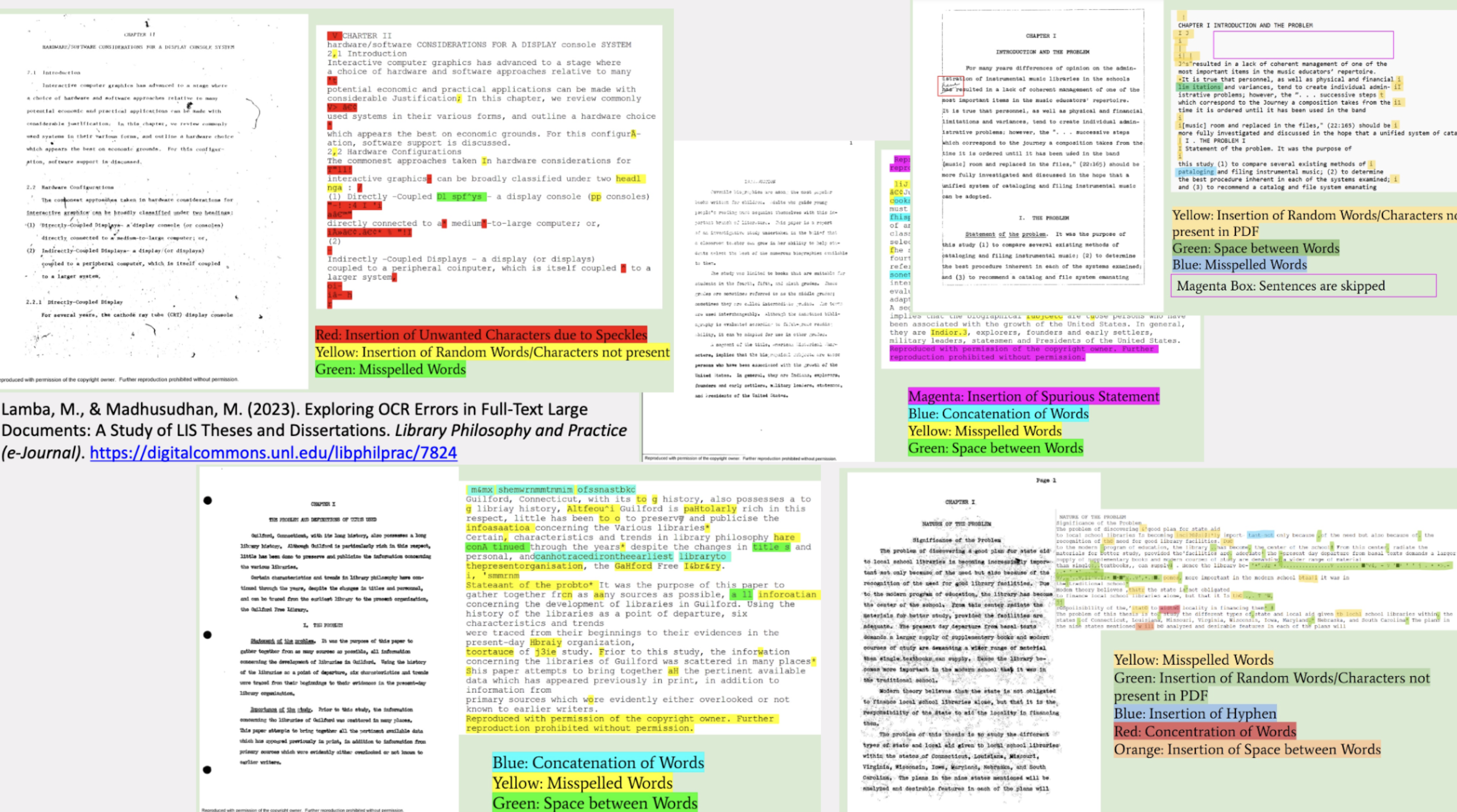
- OCR is generally very good quality material printed since 1990s, but text must still be carefully checked
- Issue of how to deal with printing effects such as hyphenation, headers and footers, footnotes
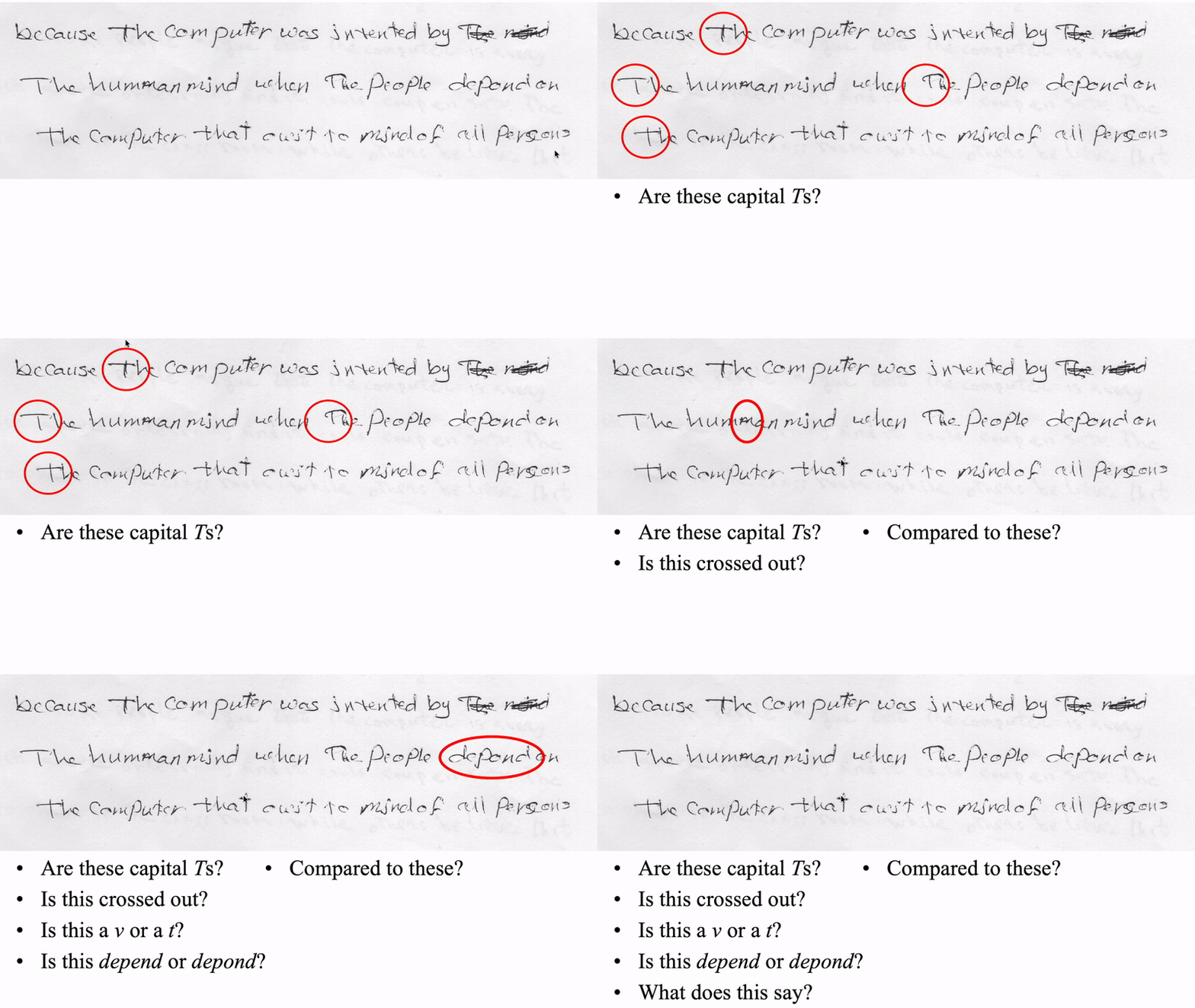
- Issues with hand-written text, typed-written, or with annotation
Criteria 6: Text Capture -> re-keying
- If OCR is not suitable/available
- eg hand-written texts, or medium is not flat
- Re-keying is only option
- Highly expensive, time-consuming and error-prone
- With manuscripts, there may be an issue of “keyboarder correction”
- Example of Learner English corpus of handwritten essays: important not to correct “errors”
- PhD student collected handwritten essays by (Arabic) learners of English for error analysis: first task was to “type them in”
Example: OCR Errors
Example: Handwritten Text
Example: Speech Corpus
- Here corpus is transcribed speech data
- Many issues surrounding transcription of speech
- Some of them similar to issues with handwriting
- Others particular to speech
Transcribing Speech
- Not just a matter of typing in what was said, though this is of course a major element
- And may not be straightforward
- How much “correction” to do in transcription
- eg of hesitations, false starts, and other speech phenomena
Example: Speech Corpus
Transcribing Speech (Cont.)
- Speech corpora usually encode information about paralinguistic and non-linguistic features
- Speed of delivery, pauses
- Loudness (whispering, shouting, singing)
- Coughs and other non-speech sounds which may be meaningful (grunt, tutting, hesitation noises)
- Even outside noises if relevant (eg passing siren, music, animals), as they might “contribute” to the discussion
- How to transcribe contractions like gotta, gonna, sorta, …
- Notice how some are completely conventional, eg can’t, won’t
- How (and whether) to transcribe partially uttered words and repetitions
- How to represent unintelligible speech
Criteria 6: Text Capture and Markup
Markup
- Issues shown in last few slides can be overcome by
mark-up - Annotate the text to show explicitly where there is anything special
- Doubtful text
- Incorrect text (mark up can show what was probably meant)
- Extraneous material
- This is also an important issue in computer storage of ancient manuscripts
Criteria 7: Storage and Access
Storage
- Where will the data be kept, and who will have access?
- If corpus is for public distribution, will it be by license, or freely available?
- If by license, distribute online (with password) or USB flash drive?
- Nowadays, fortunately, size is not such an issue though
- Big corpora have to be distributed on multiple USB flash drive or external drives
- Downloading from a website can take hours
- Note that it is not only the corpus data that must be distributed
- Many corpora have associated software packages to facilitate exploration
- For speech corpora, original recordings may be available
Criteria 7: Storage and Access
Access
- Efficient access to corpus data comes hand-in-hand with corpus structure
- No good having structured corpus if that structure can’t be used to delimit searches
- Best if corpus is cross-indexed on all searchable criteria, ie all details that are encoded in headers
Explore these Links
- “Corpora” mailing list: http://nora.hd.uib.no/corpora/
- ELRA European Language Resources Association: http://www.elra.info/
- LDC Linguistic Data Consortium: http://www.ldc.upenn.edu/
- TEI Text Encoding Initiative: http://www.tei-c.org/